
Welcome to Foxhole.
Let's get you installed.
Why install?
Home-screen icon, push notifications for new weeks, and the fullscreen experience that keeps Safari's URL bar out of your way during reps.
Foxhole installs as a home-screen app on iOS Safari. If you're on a different browser or platform, open this page in Safari on iPhone, or text Coach for help.
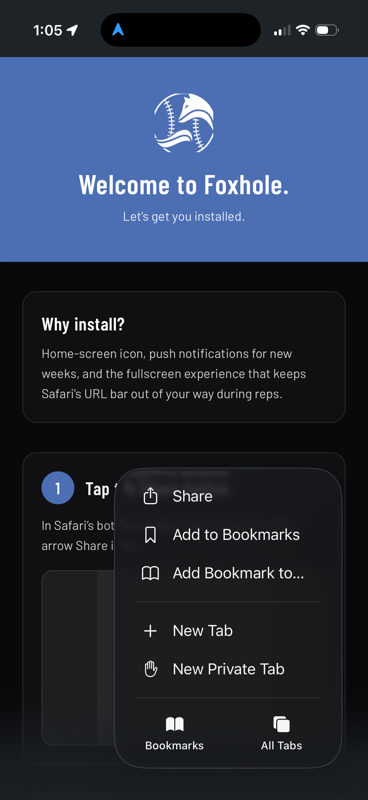
Tap the Share button
In Safari's bottom toolbar, tap the square-with-arrow Share icon.
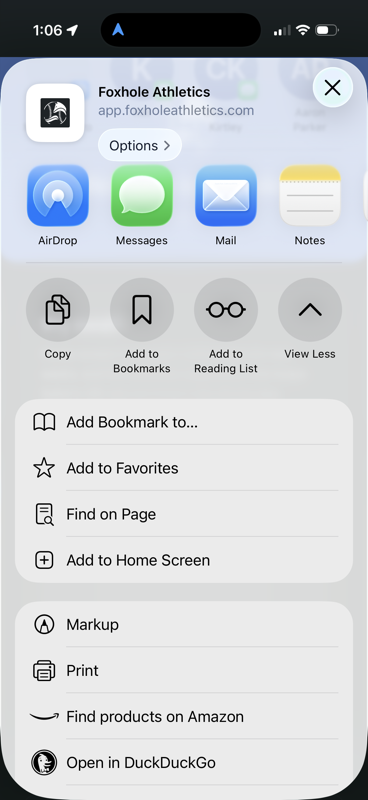
Find “Add to Home Screen”
The Share sheet opens. Scroll past AirDrop and Messages until you see Add to Home Screen, then tap it.
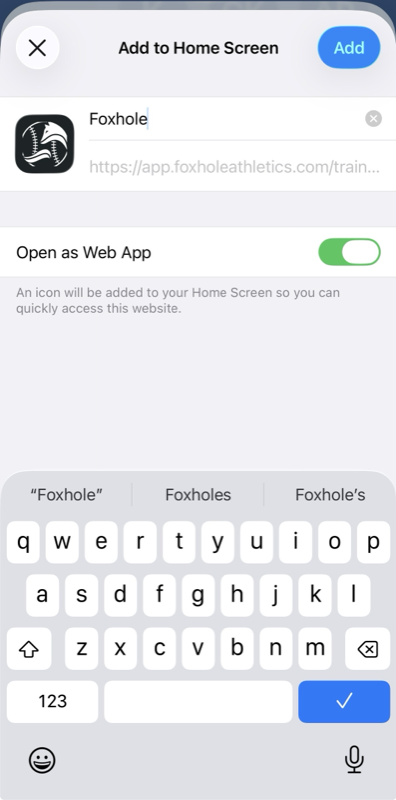
Tap “Add” to confirm
Top-right of the confirm screen. The Foxhole icon lands on your home screen.
After you install
Tap the new Foxhole icon on your home screen. Coach will text you the link to sign up next, or open sign up directly.
Android coming soon. If you're not on iOS Safari, text Coach for help.